A webhook tells another system when something happens in your organisation, instead of that system asking again and again. Each endpoint receives an HTTPS POST for the events it subscribes to. Webhooks are managed by client admins under Settings → Webhooks, and need API access in your plan, like API keys.
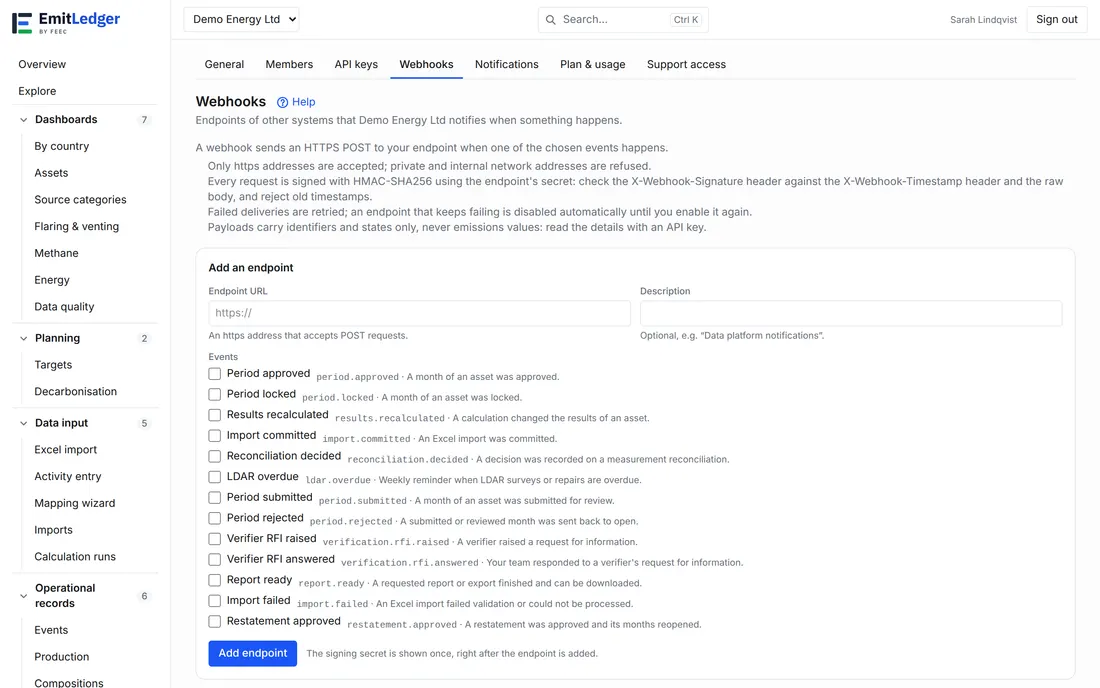
Events
| Event | When it is sent |
|---|---|
period.submitted | A month is submitted for review |
period.rejected | A submitted or reviewed month is sent back to open |
period.approved | A month is approved |
period.locked | A month is locked |
results.recalculated | A calculation run changed results |
import.committed | An Excel or mapped import is committed |
import.failed | An import failed validation or could not be processed |
reconciliation.decided | A measurement reconciliation decision is recorded |
restatement.approved | A restatement is approved and its months reopened |
report.ready | A requested report or export has finished |
verification.rfi.raised | A verifier raises a request for information |
verification.rfi.answered | A request for information is answered |
ldar.overdue | The weekly reminder finds overdue LDAR surveys or repairs |
Payloads carry identifiers and states only, never emissions values or free text. To read the details, call the partner API with a Read key.
Add an endpoint
- Under Add an endpoint, enter the Endpoint URL. It must start with
https://, and addresses in private or internal networks are refused. Redirects are not followed. - Optionally add a Description, and tick the Events it should receive.
- Click Add endpoint. The signing secret is shown once: copy it into the receiving system.
- Click Send test to queue a test ping and check the receiver in the Deliveries log.
An organisation can have a limited number of endpoints. To change an endpoint’s address, create a new endpoint and delete the old one.
Verify a request
Every request carries these headers:
| Header | Content |
|---|---|
X-Webhook-Id | The delivery id. It is the same on every retry, so use it to ignore repeats |
X-Webhook-Event | The event name |
X-Webhook-Timestamp | The time of this attempt, in Unix seconds |
X-Webhook-Signature | v1= followed by the HMAC-SHA256 of the timestamp, a dot and the raw body, using the signing secret, in hexadecimal |
Check the signature on the raw body before you parse it, compare it in constant time, and refuse requests whose timestamp is more than a few minutes old. Answer with any 2xx status within 10 seconds; do the real work afterwards.
Retries and failures
Anything other than a 2xx answer, a timeout or a connection error is a failed attempt. Failed deliveries are retried with growing delays up to a fixed number of attempts, then marked failed. Delivery is at least once, so a receiver must cope with the same event twice.
An endpoint that keeps failing is disabled after failures and stops receiving events. Fix the receiver and click Enable; the failure count starts again.
Manage endpoints
- Disable pauses an endpoint and Enable resumes it.
- Rotate secret replaces the signing secret. The old one stops working at once, so update the receiver at the same time.
- Delete removes the endpoint and its delivery log.
- Deliveries lists each event with its status, HTTP code, number of attempts and last error. Entries are kept for a limited time.
Adding, changing and deleting endpoints is recorded in the audit log.